

Log paid Stripe Checkout sessions to Google Sheets with Make
Log selected paid Checkout sessions while preserving raw amounts and currency. Sheets search-and-append is not atomic, and row writing and thank-you status need separate tracking.
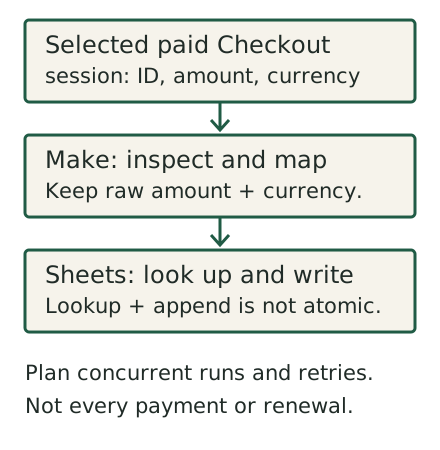
This workflow logs selected paid Checkout sessions, not every Stripe payment or every subscription renewal. Listen for checkout.session.completed and, for delayed methods, checkout.session.async_payment_succeeded. Use the Checkout Session ID to track processing. Stripe warns that the same session can reach fulfillment more than once, even concurrently; a Sheets search followed by append is not an exactly-once guarantee. Track the row write and thank-you separately so an email failure does not leave an unresolved partial run.
Before you start
- Which event? This example selects Checkout Session events, not every payment or renewal. Check
payment_status, and handle delayed success separately.customer_detailscan be absent; a paid status can include a zero-amount trial, so it is not proof of a cash sale. - Make a sheet with a stable row of headers:
Date,Session ID,Email,Name,Raw amount_total,Currency, and an optionalDisplay amount. Keep the raw amount and currency unchanged. - Stripe sends its own receipts if you've turned them on. This scenario's email is a personal thank-you, not a receipt, so word it that way to avoid confusion.
Steps
- Create a scenario in Make and add the Stripe → Watch Events module (it's tagged instant).
- Create the webhook and connection. Click Create a webhook, then Create a connection. Choose Stripe OAuth, or Stripe API Key using a restricted key (in Stripe: Developers → API keys → Create restricted key, "Providing this key to another website", name it
Make). Make registers the webhook in Stripe for you. - Pick the event. In the module's Group and events, select
checkout.session.completed. If delayed payment methods are in scope, also handlecheckout.session.async_payment_succeededand validate the paid-status path separately. Save. - Add a filter on the link after the trigger: continue only if
payment_statusequalspaidand the customer email exists. Some payment methods complete the checkout before the money settles. Those sessions show as unpaid, and you don't want to thank people yet. - Plan duplicate and partial-failure handling. Use the Checkout Session ID as a processing identifier. A Sheets Search Rows → filter → append sequence can race on concurrent events and is not atomic. This guide has not executed the zero-result route, concurrent delivery or a failed-email replay. Do not call it duplicate-proof; track the row write and the thank-you separately.
- Add Google Sheets → Add a Row. Map the session ID and available customer details. Store
amount_totalandcurrencyexactly as received. Use Stripe’s current currency rules before adding a display amount. In particular, Stripe represents 5 UGX as 500; treating UGX as amount-as-is displays a value 100 times too high. - Add the email step (for example Gmail → Send an email) to the customer's email from
customer_details. Keep it short and human. - Keep this in a sandbox until the failure cases are resolved. With permitted test data, check duplicate/concurrent deliveries, no search result, an absent email, a successful row followed by failed email, delayed success and a zero-amount session. No live-account or payment-flow execution is claimed here. A single successful test does not make this a production fulfillment design.
Stripe amount converter
Limited charge-display illustrations
Only USD, JPY, ISK, UGX, HUF and TWD charge representations are modeled from the cited source. Unknown currencies produce no conversion. ISK and UGX use a two-decimal-compatible representation; HUF and TWD payout rules differ from charges. Preserve raw values. This is not a complete currency, payout, refund or accounting validator.
What breaks
- Wrong display amounts. Check the currency’s representation before dividing by 100. Keep the raw amount available for reconciliation.
- Currency assumptions. Do not divide every currency indiscriminately. Preserve the raw values; the helper below models only a small, explicitly supported charge-display set, not payout or refund rules.
- Duplicate rows. Search, filter and append is not atomic. Concurrent runs can both see no match. A session ID is an identifier, not a lock or an exactly-once guarantee.
- Delayed methods. Stripe documents
checkout.session.async_payment_succeededfor later success. Merely listening for completed sessions is not a complete delayed-payment design. - Missing customer details. A guard can keep an absent email out of the email branch, but it does not resolve every provider failure or partial-run outcome.
- Header-row changes. Keep a stable header row and review the module’s header/column-ID settings after changing the sheet. Freezing a row keeps it visible; it does not stop someone inserting a row.
- Usage. Make usage depends on the module and billing rules, including retries. Check the scenario's usage after the first busy week.
Make has a free plan for trying scenarios like this one. Check your monthly allowance before you rely on it in production.
A local check for this task
Model task and credit assumptions separately from a payment’s value.
Sources
- Make Help: Stripe app (connection, restricted key, Watch Events) (checked Nov 7, 2026)
- Make Help: Google Sheets app (checked Nov 7, 2026)
- Stripe API: Checkout Session object (checked Nov 7, 2026)
- Stripe Docs: Supported currencies (zero-decimal and special cases) (checked Nov 7, 2026)
- Stripe Docs: Webhooks, "Handle duplicate events" (checked Nov 7, 2026)
- Make Community: How to get payment amount value in decimals?
- Stripe: Checkout fulfillment, concurrent delivery and delayed success (read November 7, 2026)
- Make: Google Sheets module/header settings (read November 7, 2026)
Published November 7, 2026. Sources last read November 7, 2026. Send a correction.